


AI Music: Cover & Song Maker
3.4723.00 Reviews
App Specs
- Version
- 2.8.1
- Updated On
- License
- Free
- Downloads
- 500,000+
- Developer
- Prodfire LLC
- Categories
- Music & Audio
- Platform
- Android
Screenshots

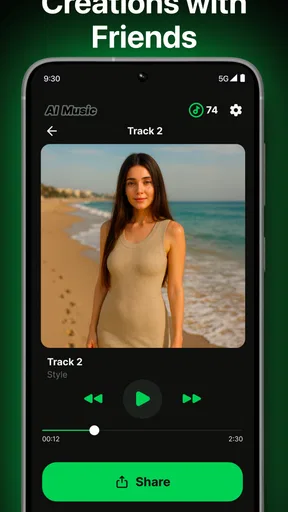
 Analysis by AppCompare
I judge a music-making app less by how impressive its first result sounds than by whether it helps me get from a passing idea to something I actually want to keep. That is the question I bring to AI Music: Cover & Song Maker, a free music and audio app from Prodfire LLC. Its focus is approachable AI-assisted song and cover creation, so it is aimed at people who want to experiment without first learning a full desktop production setup. The main trade-off is that an AI-led workflow is not the same as having precise, hands-on control over every musical detail.
That distinction matters if you are deciding whether to try it. I see the app as a place to explore possibilities, sketch a mood, or make a playful version of a familiar song—not as a replacement for a recording studio or a detailed digital audio workstation. If you enjoy trying variations and judging them by ear, that can be a rewarding way to start. If you already know exactly how you want every instrument and vocal part to sound, a conventional production tool may give you more direct control.
When the connection becomes part of the creative process
AI-assisted creation naturally makes network access part of the experience to consider. In practical terms, I would begin a session somewhere with a dependable connection rather than assume every part of a generation workflow will be ready wherever I happen to be. A result may take longer to reach you when connectivity is poor, and that can interrupt the fun of quickly trying one idea after another. I would treat the app as a connected creative tool unless I had personally checked how it behaves in a particular offline situation.
That changes how I would use it on the move. If a melody comes to mind on a commute, I might note the mood or style I want to try, then make the actual generation when I have a steadier connection. This is a small habit, but it avoids turning a quick creative impulse into a frustrating wait. It also helps separate the part that is entirely yours—the idea—from the part that may depend on the app responding online.
Mobile moments where it makes sense
The strongest everyday fit is a short, low-pressure session: testing a sound for a personal project, making a rough musical idea to share with a friend, or seeing how a different style changes the feel of a tune. I would not open it expecting the same depth as a multitrack studio app. Instead, I would use the phone as a convenient place to explore, listen, and decide whether an idea is worth developing further elsewhere.
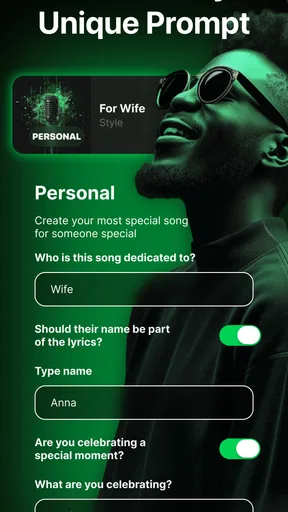
For example, imagine you are putting together a small birthday video and want a musical mood that feels more personal than a generic background track. You could use a quiet moment at home to explore a direction, listen carefully to the result, and decide whether it suits the video before spending time editing around it. The practical advantage is not guaranteed perfection; it is having a quick way to test a musical possibility. If the result misses the mood, that is useful information too, and you can change the direction rather than build the whole project around the first output.
What to do when a session stalls
AI generation can make a pause feel different from a delay in a standard audio editor: you are waiting for a creative response rather than simply moving a control. If a session stops progressing, I would first check the connection and give the current attempt a moment before repeatedly submitting the same request. Repeated taps can make it harder to tell whether the first action is still underway or whether anything has changed.
Worth Reading Before You Choose

Flipboard Shows What News Apps Must Do Beyond the Feed

Switching to Android Auto Means Rethinking Your Driving Routine

Google Calendar Makes a Crowded Week Easier to Manage

Ludo King Makes the Most of the Minutes Between Plans

Baby Panda World Brings Quick Play to Modern Phones, but Its Game Library Feels Busy

ESPN’s Live Game View Makes Following Close Games Easier
I would also keep the work in small stages. Try one clear direction, listen to what comes back, and only then decide what to adjust. That makes it easier to recover from a stalled or disappointing attempt because you have not built a long chain of decisions on top of it. I would save or share a result when the app offers a suitable route and I am happy with it, rather than assume every experiment will remain easy to find later.
Using an AI music app thoughtfully
There is a useful balance between convenience and being deliberate about what you send into a connected creative service. For casual experiments, I would keep prompts and source material simple and avoid including personal details that have nothing to do with the music. If you are preparing something for a public post, listen through the whole result and consider whether the cover or song fits the context before sharing it. A quick generation can be a draft, not a reason to skip your own judgment.
I would also be realistic about what “making it your own” means here. An AI-generated variation can give you a starting point, but it may not offer the detailed authorship choices or editing precision that a musician wants for a finished release. For a private joke, a creative warm-up, or a rough idea, that limitation may not matter. For a polished track where every performance and arrangement decision counts, I would use a more hands-on workflow and treat AI output, if used at all, as inspiration rather than the final mix.
Getting Started with AI Music: Cover & Song Maker
First off, setting up AI Music: Cover & Song Maker is a breeze. Download it from your usual app store, open it up, and you’re greeted with a sleek and intuitive interface. No unnecessary clutter – just everything you need to start making music. For someone like me who’s not exactly a tech wizard, this is a huge plus.
The app offers a quick tutorial to get you acquainted with its main features. You’ve got options to create covers or original songs, which is pretty exciting. Whether you’re a seasoned musician or a complete newbie, there’s something here for you.
The Creative Process
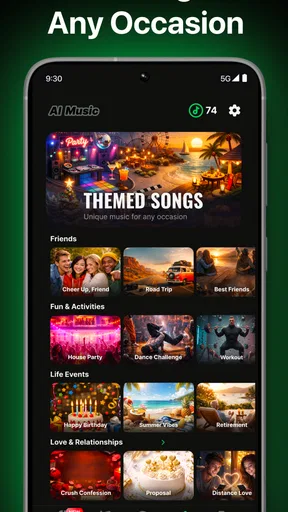
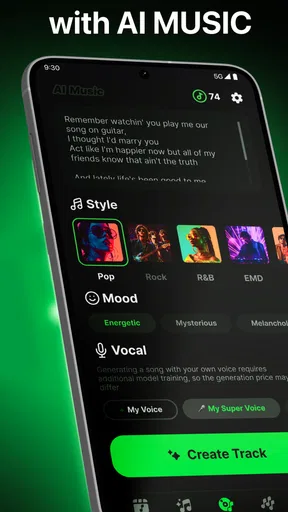
Alright, here’s where the magic happens. The app uses AI to help you create music, and let me tell you, it’s quite impressive. You start by selecting a genre or mood, and the AI generates a melody for you. It’s like having a mini composer in your pocket. You can tweak the melody to your liking, add different instruments, and even adjust the tempo.
The cover creation feature is equally cool. Pick a song, and the AI helps you create a unique version of it. You can modify it as much or as little as you like, making it truly your own. It’s perfect for those who want to put a personal spin on their favorite tracks.
Features That Stand Out
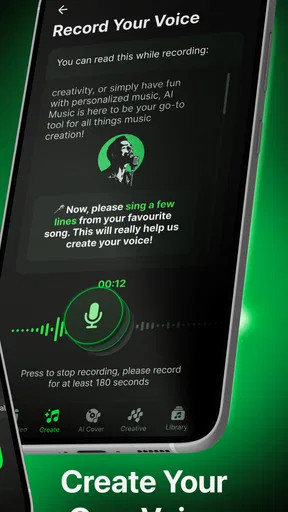
There are a few features that really caught my attention. First, there’s the vocal synthesizer. You can add vocals to your tracks without needing a singer. The AI does a pretty good job of making it sound natural, which is impressive. It’s like having your own band without the drama.
Another neat feature is the collaboration tool. You can work on a track with friends or other users from around the world. It’s a fantastic way to get different perspectives and make your music even better. Plus, it’s super easy to share your creations on social media or music platforms.
Room for Improvement
Now, as much as I enjoyed the app, it’s not perfect. One thing I noticed is that the AI sometimes struggles with more complex compositions. It’s great for simpler tunes, but if you’re aiming for something intricate, you might find it a bit lacking. Also, while the app is free, some features require a subscription. It’s not a deal-breaker, but it’s something to keep in mind.
Another point is that the app could benefit from more tutorials or guides, especially for beginners. While the interface is user-friendly, a little extra guidance would make the learning curve even smoother.
Where it fits among music-making options
Compared with a traditional music editor, this app puts more emphasis on getting an AI-assisted idea quickly than on building every note and sound from scratch. That is a useful distinction: a beginner can try a genre or mood without needing to understand a full arrangement, while a more experienced musician may find the generated starting point handy but want to move the result into a tool with finer editing controls. The right choice depends on whether you want inspiration or exact production control.
It also differs from simply choosing a ready-made soundtrack. A generated cover or song gives you a chance to shape the direction, but it still takes listening and judgment to decide whether the output works. I would not treat the first result as automatically finished. A practical approach is to make one version for a specific purpose, compare how it feels against that purpose, then adjust the mood, instruments, or tempo rather than changing several things at once. That makes the creative choices easier to evaluate.
The app is most appealing to curious newcomers, casual creators, and people who want to experiment with vocals or a new musical direction without recruiting performers. It is less suitable for anyone who needs detailed control over complex compositions, expects a dependable offline workflow, or wants a fully transparent, professional production process from the first tap. The vocal synthesizer and collaboration tools widen the possibilities, but neither removes the need to listen critically or to choose another tool when a project calls for more precision.
Price, access, and expectations
There is no upfront price to try the app, which makes it easier to see whether its creative approach suits you. In-app purchases range from $0.99 to $49.99 per item, so I would check what a particular paid option includes before committing rather than assume every feature is covered by the free experience. The app is rated for Everyone, and its current version is 2.1.1. It was released on October 15, 2024, and requires Android 10 or later.
Its average rating is 3.4 from around 12,000 ratings, with 609 written reviews, and it has passed 500,000 installs. I take that as a reason to set expectations rather than as a verdict on whether I will enjoy it: AI music tools can be exciting for one short experiment and frustrating when the result does not match a very specific idea. The best test is to try a modest project first and decide whether the balance of convenience, creative control, and paid options works for you.
Final Thoughts
All in all, AI Music: Cover & Song Maker is a fantastic tool for anyone looking to dive into music creation. It’s fun, easy to use, and offers a lot of creative freedom. Whether you’re looking to create some catchy tunes or remix your favorite songs, this app has got you covered.
So, if you’ve got a melody in your head that you’re itching to bring to life, give this app a shot. It’s a great way to explore your musical side without needing a full recording studio. Plus, who doesn’t love a bit of AI magic in their creative process?
My connectivity verdict
For me, the connection question is a practical part of deciding when to use the app, not a reason to dismiss it. I would reserve generation and collaborative sessions for a time and place where access is reliable, and use the phone for quick creative exploration when that setup makes sense. If you mainly want a spontaneous tool that works identically in every network situation, this may not be the safest assumption; if you are happy to plan around connected sessions, the app offers an accessible way to play with musical ideas.
My recommendation is to start with one small goal: a mood experiment, a cover variation, or a vocal idea you can judge in a few listens. That gives you a fair feel for both the AI’s strengths and its limits before you invest time or money. If you want a friendly entry point into AI-assisted music, it is worth a try; if you need intricate arrangement control or a workflow you can rely on away from a connection, a conventional audio editor is likely the better fit.
Pros
- Easy-to-use interface for beginners.
- Wide variety of music styles available.
- Real-time editing capabilities.
- High-quality audio output.
- Integrates well with social media.
Cons
- Limited free features without subscription.
- Occasional glitches in song processing.
- Requires constant internet connection.
- Ads can be intrusive at times.
- Some music styles lack depth.
FAQs for AI Music: Cover & Song Maker
What is AI Music: Cover & Song Maker?
AI Music: Cover & Song Maker is an innovative app that allows users to create music covers and original songs using AI technology. It offers a range of features to customize tunes, including voice modulation and instrument selection, making it ideal for both casual music enthusiasts and aspiring artists.
How does the AI technology work in this app?
The app utilizes advanced AI algorithms to analyze user inputs and generate music compositions. Users can input melodies, lyrics, or choose from various templates, and the AI assists in creating harmonies, rhythms, and instrumentals, ensuring a seamless music creation experience even for beginners.
What features does AI Music: Cover & Song Maker offer?
This app provides various features, including voice modulation, tempo adjustment, and a vast library of virtual instruments. Users can also collaborate with friends, share their creations on social media, and access a variety of templates to jumpstart their music projects.
Is AI Music: Cover & Song Maker user-friendly for beginners?
Yes, the app is designed with a user-friendly interface that caters to both beginners and experienced musicians. It offers tutorials, intuitive controls, and easy navigation, allowing users of all skill levels to create and edit music effortlessly without prior technical knowledge.
Are there any in-app purchases or subscriptions required?
AI Music: Cover & Song Maker offers a free version with basic features. However, for advanced tools and additional content, users can opt for in-app purchases or a subscription model. This provides access to premium templates, exclusive instruments, and ad-free usage.


